Build a GPT-Live-1 avatar with Anam and LiveKit
OpenAI has just brought GPT-Live-1 to the API, giving you a voice model that keeps listening while it speaks. You can interrupt an answer, pause to think, or add a detail while it works on your request. Those are ordinary parts of a conversation, and they're also some of the hardest things to get right in a voice agent.
We wanted to give the new model a face. So we built an integration to connect GPT-Live-1 to an Anam avatar through LiveKit.
Below, we'll explain what makes GPT-Live-1 different, walk through a demo, and show you how to connect GPT-Live-1 to your own interactive avatar.
What is GPT-Live-1?
GPT-Live-1 is OpenAI's full-duplex speech model. It processes incoming audio while producing its own speech, so listening and responding can overlap. That lets it acknowledge you with a short "mm-hmm," leave space while you think, or yield when you want to take over.
If you've built a voice agent with separate speech-to-text, LLM, and text-to-speech services, you've most-likely had to coordinate those handoffs. A voice activity detection (VAD) model detects speech and silence, giving your turn-taking logic a signal for when to respond.
GPT-Live moves that timing decision into the voice model. Incoming and outgoing audio are continuous streams, with the model deciding how to participate as it hears more of the conversation. OpenAI's engineering blog explains how inference stays active throughout that exchange.
Say you're building a voice agent to take orders at a pizza shop. A customer asks for "the pepperoni... actually, make that a Margherita." Their pause after "pepperoni" doesn't mean they've finished ordering. A quiet "yeah" while your agent reads the order back doesn't necessarily mean they want it to stop, either. Full-duplex interaction gives the model the context to make those conversational judgments.
You can also steer the speaking style through its prompt, including pace and how often it offers listening acknowledgments. In a traditional STT → LLM → TTS pipeline, you tune speech recognition, the LLM's responses, and speech synthesis separately, then coordinate the timing between them. GPT-Live brings speech understanding, delivery, and turn-taking into one model. You can guide that conversational behavior through its prompt without wiring together separate recognition and speech services.
Giving the model a face
Anam takes the speech coming out of GPT-Live-1 and generates a realtime avatar as it talks. You choose the avatar's appearance in Anam, then connect the two through LiveKit's agent framework.
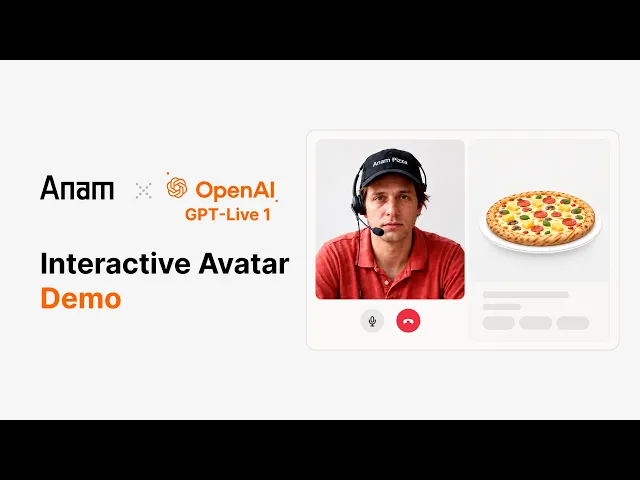
As shown in the video above, we used that combination to build Anam Pizza Counter, a slightly sarcastic character who takes your pizza order beside a 3D rendered preview of your imaginary pizza order. You tell it which pizza and toppings you want, then see the completed order appear. Change your mind, and you can talk through a correction. There's no topping picker to click; the conversation controls the order.
Behind the scenes, a tool call updates the browser's order state and returns what it accepted. The 3D rendered preview reflects the accepted order. We'll come back to this connection between speech and application behavior after the quick start. First, let's look at how to set up GPT-Live-1 with an Anam avatar.
Build your own GPT-Live-1 avatar
Your app has a Python agent running on the server and a browser client where you see and speak to the avatar. The agent connects GPT-Live's speech output to Anam's face generation, with LiveKit carrying the media between the server and browser.
LiveKit gives your browser and Python agent a shared room. Your browser publishes microphone audio; your agent sends it to GPT-Live-1. In the other direction, your agent routes generated speech through Anam, which publishes the avatar's audio and video back into the LiveKit room.
You connect both integrations to a LiveKit AgentSession. GPTLiveModel supplies the speech model, and Anam's AvatarSession attaches the avatar. If you already have an agent using Anam's LiveKit integration, these are the same session and avatar objects.
To get started, we'll use LiveKit's browser console as the frontend. You'll have a general assistant you can speak with, without needing to build an ordering interface.
Prerequisites
Before you start, you'll need the following.
Python 3.12 or later and uv.
A LiveKit Cloud project, with its URL, API key, and API secret.
LiveKit CLI
An OpenAI API key with access to
gpt-live-1andgpt-5.6-lunaAn Anam API key and an available Cara 4 avatar ID. Sign up here for a free account.
Install the plugins
Create the project and install the two plugins.
Put your credentials in .env.local.
Keep your Anam, OpenAI, and LiveKit API credentials in your agent's server environment or secret store. Add
.env.localto.gitignore. Your frontend should receive only a scoped LiveKit participant token from your server.
Connect the voice and avatar
Save the following as agent.py. It creates the voice session, attaches the Anam avatar, and starts a general assistant.
An audio-driven avatar needs the spoken response to generate matching video. In an STT → LLM → TTS pipeline, that audio comes from your TTS service; here, it comes directly from GPT-Live-1. Anam needs to be connected to that output before the conversation starts, which is why avatar.start() comes before session.start(). We also disable false-interruption resume because the avatar output doesn't support pausing and resuming queued speech.
The code also has two sets of instructions because GPT-Live-1 can delegate work to a separate text model. Your Agent instructions shape the spoken conversation and tell it when to delegate. The instructions in responses_options tell the backend model how to handle that request. This example uses GPT-5.6 Luna through Responses delegation and can answer questions, but it usually is helpful when you want to perform tool calls or actions.
For instance, if you're building a tutor, you would use your voice prompt to tell the model to let the learner finish an attempt before responding. You’d also put the exercise rules and instructions for assessing the answer in your backend prompt. OpenAI's GPT-Live prompting guide covers that division in more detail.
With an STT → LLM → TTS pipeline, you'd normally give the LLM both the character and task instructions, then pass its answer to TTS. Here, you give GPT-Live-1 the conversational role and the backend model the task rules, so the conversation can continue while the backend works.
Join the conversation
Start your agent.
Open Agent Console from the Agents dashboard in the same LiveKit Cloud project. Select gpt-live-avatar as the agent name, start a session, and allow microphone access.
Say hello. This sample waits for you to speak first, so you should hear a reply and see the avatar speaking. Ask it to explain something, then interrupt with a different question.
If the agent isn't available, check that the project credentials and agent name match the Console. If it's connected but can't hear you, check microphone permission. For an avatar that appears but stays silent, check the agent logs for OpenAI access or model errors.
Adding Tool Calling to the Avatar
Give your avatar a tool it can use to answer a question. For example, add this function above entrypoint() to let it check the current time.
Add tools=[get_current_time] to the Agent inside session.start(). In that agent's instructions, tell it to delegate current-time questions. Replace the responses_options instructions with "Use get_current_time to answer questions about the current time. Return the tool's result."
Ask your avatar what time it is. The backend selects the tool, LiveKit runs your function, and GPT-Live-1 speaks the result. You can use the same pattern to look up information from your own application.
If you'd like to set up the Anam Pizza Counter demo, check out the GitHub repository. You can try out the demo here.
Sign up for a free Anam account and try it out at lab.anam.ai/register
Frequently asked questions
Can GPT-Live-1 see the user's camera?
The LiveKit GPT-Live plugin used here accepts audio, not camera or screen input. Displaying an avatar doesn't give the model vision.
Do I need a separate text-to-speech service?
No, GPT-Live-1 produces the speech in this setup. Its LiveKit plugin doesn't support a text-only output mode for routing responses through a separate TTS provider.
Can I choose a different Anam avatar?
Yes, replace ANAM_AVATAR_ID with another avatar available to your Anam account. The example selects Cara 4, so use an avatar supported by that model.
What's the difference between GPT-Live-1 and a traditional voice agent model?
In a traditional STT → LLM → TTS voice agent, separate services transcribe speech, generate a response, and speak it, with turn-taking logic coordinating when to respond. GPT-Live-1 processes incoming audio while generating speech and controls its own conversational timing, so you can guide its speaking and listening behavior through the voice prompt.
Explore more articles



© 2026 Anam Labs
SOC 2 Type II report · HIPAA-aligned controls.