Frame processing in Pipecat: custom video filters
Pipecat is Daily’s open-source Python framework for building real-time voice and multimodal AI agents. At its core, a Pipecat voice agent is a pipeline of processors passing typed frames to each other: audio, text, images, control signals. If you’ve worked with media pipelines before (GStreamer, FFmpeg filter graphs), the model will feel familiar. If you’re coming from web development, think of it as middleware for real-time media.
I’ve been working with Pipecat at Anam to build the pipecat-anam integration, which adds a live interactive avatar to any Pipecat agent. That work made it clear that understanding Pipecat’s frame system is what separates a quick prototype from a pipeline that handles production edge cases cleanly. This post walks through the pipeline lifecycle, the frame type hierarchy, and how to write your own frame processor, using a video aspect-ratio problem we solved as a concrete example.
The pipeline lifecycle
A Pipecat pipeline is a sequence of FrameProcessor instances. When you create a PipelineTask and call run(), three phases happen:
Startup. A StartFrame propagates through every processor in sequence. Each processor uses this to initialize: open connections, load models, allocate buffers. If your processor needs to talk to an external API or establish a WebRTC session, this is where that happens.
Processing. Frames flow through the pipeline continuously. Each processor’s process_frame(frame, direction) method receives every frame that reaches it. The processor inspects the type, decides whether to transform, absorb, or pass it through, and calls push_frame() to send the result to the next processor.
Always call super().process_frame() first. It handles system-level frame routing that you don’t want to bypass. The direction parameter tells you whether frames are flowing downstream (toward the output transport) or upstream (back toward input). Most data frames flow downstream; some control signals propagate upstream.
Shutdown. When a StopFrame arrives, or the task is cancelled (eg when the user disconnects), each processor cleans up. Close connections, flush queued data, release resources. Getting cleanup right matters in production, where sessions start and stop continuously and leaked resources accumulate.
Frame types that matter
Pipecat organizes frames into three families. The family determines how the frame is routed and what your processor should do with it.
System frames
Infrastructure signals managed by the pipeline runtime. These propagate through every processor regardless of what your process_frame does.
StartFrame fires when the pipeline initializes. Open connections, allocate resources here. For services that depend on an external backend, StartFrame is where you block until that connection is live. In AnamVideoService, for example, we block on StartFrame until the WebRTC session is established and we receive the connectionReady signal. This matters because any audio frames arriving before the session is up have nowhere to go. They get dropped. In practice, this means a welcome message (a very common pattern to initiate the conversation) can be partially or fully lost if it’s queued before the avatar session is ready. The alternative, buffering that audio, would introduce a latency build-up that compounds through the rest of the session.
ErrorFrame signals something went wrong upstream. Downstream processors can react to errors without polling or explicit error channels.
InterruptionFrame is the most important frame for conversational agents. When the user speaks while the agent is still outputting, the pipeline raises this. Every processor that’s generating or buffering data needs to stop, flush its queue, and reset to a listening state. Handle this wrong and you get audio pile-ups, stale video frames, or an agent that talks over the user.
Control frames
Pipeline-level commands. Unlike system frames, your processor chooses how to respond.
StopFrame tells the pipeline to shut down gracefully. Clean up and propagate.
OutputTransportReadyFrame signals that the output transport (typically a WebRTC connection to the end user) is ready to receive data. This is your cue to start producing.
Data frames
The actual content flowing through the pipeline.
TTSAudioRawFrame carries raw PCM audio from text-to-speech. This drives the voice the user hears.
OutputImageRawFrame carries a single video frame as raw pixel data (packed RGB24 bytes). This is what the user sees: an avatar face, a shared screen, or any other visual.
SpeechOutputAudioRawFrame carries audio output at playback speed. This is distinct from TTSAudioRawFrame, which carries TTS data chunks sent as fast as the TTS provider can produce them. SpeechOutputAudioRawFrame is a continuous stream at the rate the listener consumes it. In AnamVideoService, both SpeechOutputAudioRawFrame and OutputImageRawFrame come from the Anam Python SDK via async iterators and are pushed downstream as we receive them. The service does not forward the incoming TTSAudioRawFrames, because the TTS audio is unsynchronized and could interfere with other processors downstream. Only the synchronized audio and video coming back from Anam are pushed down the pipeline for egress.
The general rule: let super() handle system frames, respond to and propagate control frames, transform or pass through data frames.
Adding a face with Anam’s video service
A standard Pipecat voice agent has four stages: speech-to-text, language model, text-to-speech, and transport output. To turn it into a video agent, you add a video service between TTS and the output transport.
Anam’s AnamVideoService is a FrameProcessor that consumes TTSAudioRawFrames and produces synchronized audio and video. It sends chunks of TTS audio to Anam’s backend over a websocket, where the face model generates the visual output. The backend returns a lip-synced avatar that moves its head, and shows expression, all derived from the ingested audio signal. The audio and video stream from Anam’s backend are returned over webRTC and converted to SpeechOutputAudioRawFrame and OutputImageRawFrame.
The pipeline reads left to right: audio in → transcription → reasoning → speech → face → video out. Each stage is a FrameProcessor, receiving frames from the previous stage and pushing to the next.
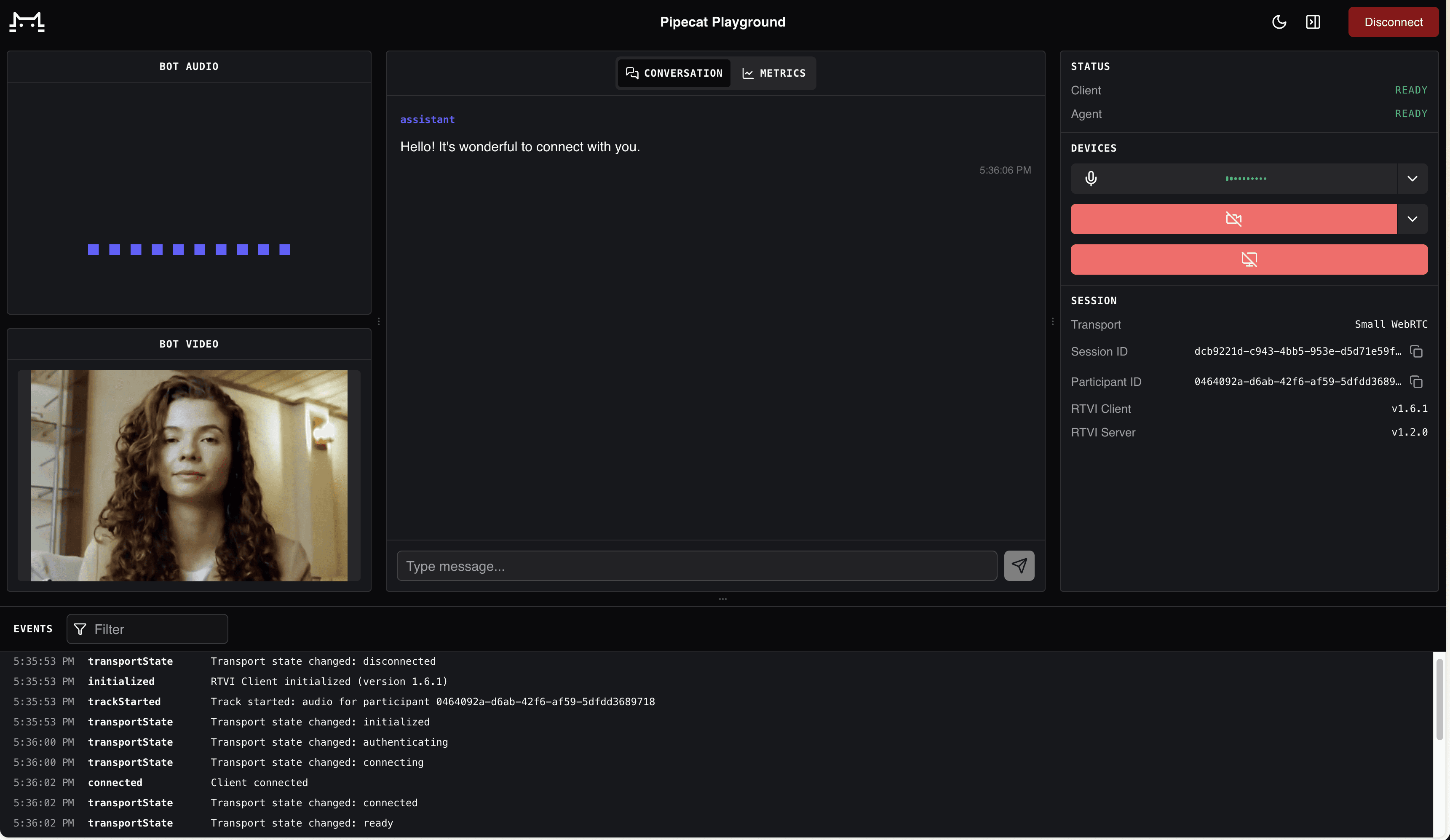
The avatar running locally via Pipecat’s built-in WebRTC transport.
AnamVideoService handles InterruptionFrame internally. When the user interrupts, it signals the Anam backend to stop generating, clears its send buffer, and the avatar stops talking. No orphaned audio or stale frames leak downstream.
The PersonaConfig passed to the service determines which avatar face to use. enable_audio_passthrough=True tells Anam to skip its own orchestration layer and render the face directly from the TTS audio your pipeline provides. The voice comes from whatever TTS service you’ve chosen upstream. This gives you full control over the STT → LLM → TTS chain while Anam handles the visual layer.
For the full working implementation, see examples/video-avatar-anam-video-service.py in the pipecat-anam repo. The integration announcement on this blog covers the setup in more detail.
Writing a custom frame processor
The real power of Pipecat’s architecture is that you can insert your own processor anywhere in the chain. If you can express your operation as “for each frame of type X, do Y and push the result,” it’s a frame processor.
Here’s a problem we ran into. Anam’s avatar output has a fixed aspect ratio determined by the face model’s native resolution. If your output transport is configured for a different ratio (say 720x720 for a square video call), the transport will scale the image to fit. That stretches the face horizontally or vertically. Stretched faces look wrong.
The fix: a processor that center-crops each OutputImageRawFrame to the target aspect ratio before the transport scales it. Crop to the right proportions first, then let the transport resize a correctly-shaped image.
The CenterAspectCropFilter we wrote for this follows a straightforward logic:
Receive a frame. If it’s not an
OutputImageRawFrame, pass through unchanged.Compare source and target aspect ratios.
If the source is wider than the target, crop equal pixel columns from left and right. If taller, crop rows from top and bottom.
Push the cropped frame downstream.
The crop operates directly on packed RGB24 bytes. It never allocates a buffer larger than the input frame, and the aspect ratio comparison is done using integer math. These details matter at 30 fps in a real-time pipeline where you’re burning through your latency budget.
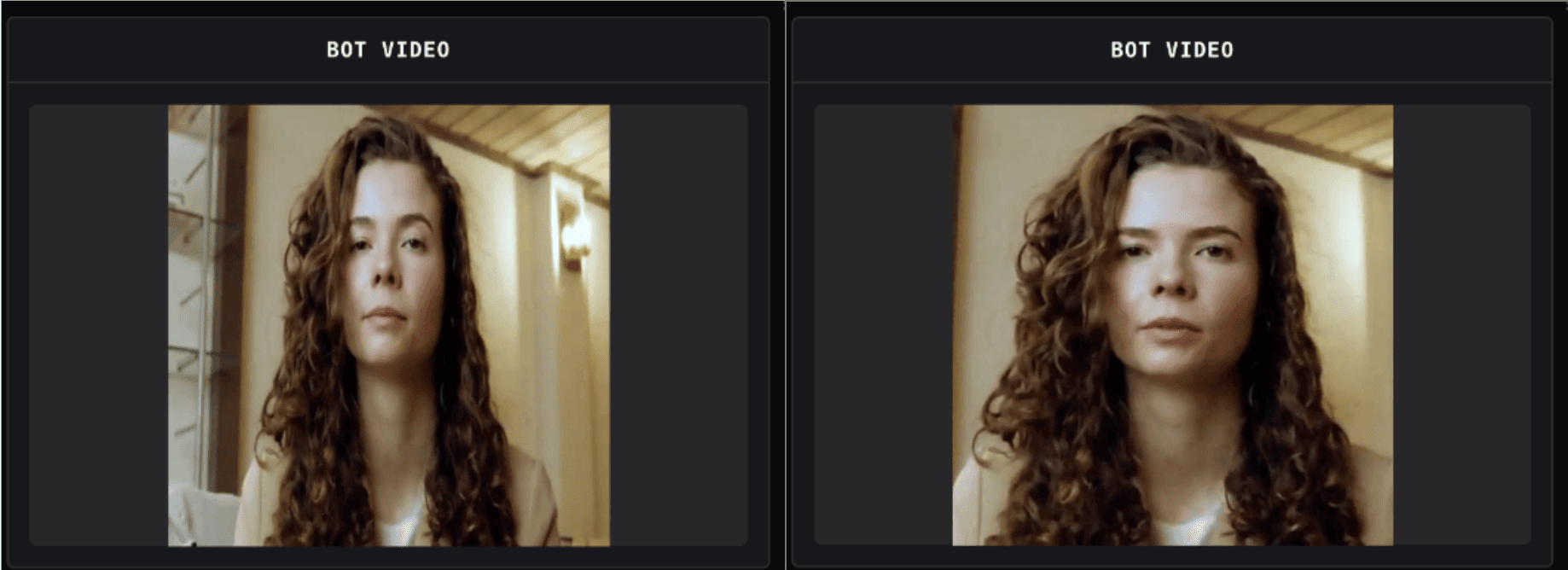
Left: the avatar stretched to fill a square output. Right: center-cropped to correct proportions before output scaling.
This same pattern works for other video post-processing tasks. A watermark overlay would check for OutputImageRawFrame, composite a logo onto the pixel buffer, and push the result. Letterboxing would pad the frame with black rows or columns instead of cropping. Color correction would transform RGB values per pixel. The processor shape is always the same: check frame type, transform the pixels, push.
However, there are limits to what you can do with per-pixel operations in Python at real-time speed. A single crop or overlay is fine. But when you need to chain multiple post-processing steps, or when the operation involves mathematically expensive transforms like scaling or affine warps, the per-frame cost adds up fast. At that point it’s worth building a PyAV pipeline that handles the video processing and feeds the results back into Pipecat frames.
Running the examples
Use Python 3.11+ and Pipecat 1.8.0+ for the current examples. Clone the repo and install its example dependencies:
Run the basic avatar example with Pipecat’s built-in WebRTC transport:
Open the URL it prints and you’ll see the avatar. For the crop filter example:
Both examples accept -t daily if you prefer Daily’s transport. You’ll need API keys for Anam (avatar), Deepgram (STT), Cartesia (TTS), and Google (LLM). The getting started guide covers Anam API key setup; the repo’s README lists the full environment variables.
Where to go from here
Pipecat’s frame-based design makes it straightforward to add a video avatar to an existing voice agent. Drop in AnamVideoService, optionally add a post-processing filter, and your agent has a face. The frame pipeline handles the orchestration, the transport, and the real-time delivery.
The Pipecat documentation covers the framework fundamentals. The pipecat-anam repo has the working examples from this post. For questions about the Anam integration or avatar pipeline optimization, find us on the Anam Community Slack or in #community-integrations on Pipecat’s Discord.
Explore more articles


© 2026 Anam Labs
SOC 2 Type II report · HIPAA-aligned controls.