

Want to use ElevenLabs Agents with Anam? We recommend the server-side ElevenLabs integration instead—it’s simpler and has lower latency. This page covers the client-side approach for when you need direct control over the audio pipeline.
View Example
Full source code for the ElevenLabs conversational agent with Anam avatar (client-side).
How It Works
The integration uses Anam’s audio passthrough mode, where Anam renders an avatar that lip-syncs to audio you provide—without using Anam’s own AI or microphone input.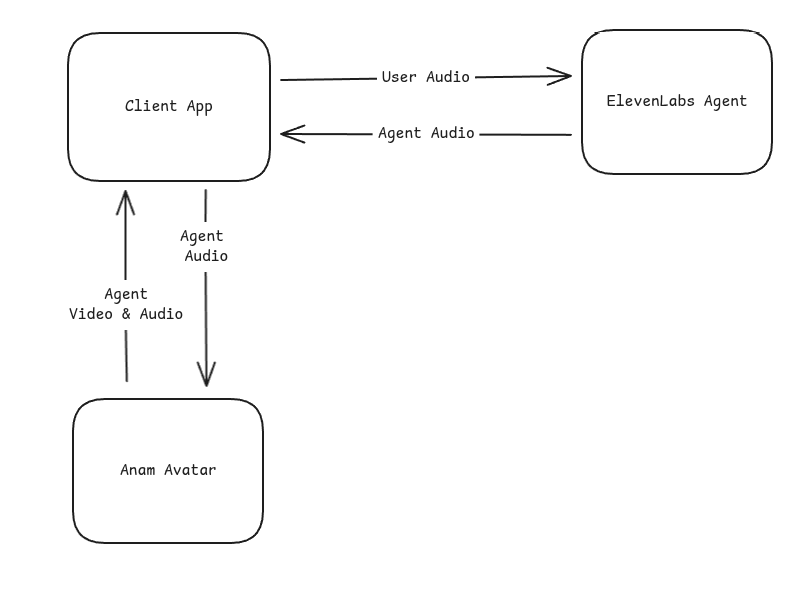
Quick Start
Prerequisites
- An account with your TTS provider (ElevenLabs used in this example)
- Anam account with API access
- Node.js or Bun runtime
- Modern browser with WebRTC support (Chrome, Firefox, Safari, Edge)
Installation
chatdio provides microphone capture utilities used to send user audio to ElevenLabs.
Basic Integration
Here’s the core pattern for connecting an external TTS source to Anam:Full Example
Project Structure
Server: Create Anam Session
Your server creates an Anam session token withenableAudioPassthrough: true:
config.ts
Client: ElevenLabs Module
Handle the WebSocket connection and microphone capture:elevenlabs.ts
Client: Main Integration
Wire everything together:client.ts
Cleanup
Stop the conversation and release resources:Configuration
Environment Variables
1
Get your API credentials
You’ll need credentials from both services:
2
Set environment variables
.env
ElevenLabs Agent Setup
When configuring your ElevenLabs agent, set the output audio format to match Anam’s expectations:
Enable the
agent_response_complete and interruption events in the agent’s Advanced → Client Events settings. The agent_response event is sent with the first audio chunk, so it does not indicate that the audio sequence is complete. See ElevenLabs client events.
Choosing an Avatar
Stock Avatars
Browse ready-to-use avatars in our gallery. Copy the avatar ID directly into your config.
Custom Avatars
Create your own personalized avatar in Anam Lab with custom appearance and style.
Audio Passthrough API
To guide avatar expression in audio passthrough sessions, send Director Notes cues over the data channel. See Director Notes.
createAgentAudioInputStream()
Creates a stream for sending audio chunks to the avatar for lip-sync. Must be called afterstreamToVideoElement() resolves (the session must be started first).
string
required
Audio encoding format. Only
pcm_s16le (16-bit signed little-endian PCM) is supported.number
required
Sample rate in Hz. This must match the PCM audio sent to the stream.
number
required
Number of audio channels in each chunk. Use
1 for mono or 2 for stereo.sendAudioChunk()
Send a PCM audio chunk for lip-sync rendering. The method accepts anArrayBuffer, Uint8Array, or base64-encoded string. The SDK converts binary input to base64, attaches the stream configuration, and increments the sequence number for each chunk.
endSequence()
Signal that the current audio sequence has ended. The SDK sends an end-of-sequence message and resets its sequence number to0 for the next turn.
- Your TTS provider confirms that it has sent the final audio chunk for the turn
- The user interrupts (barge-in)
endSequence() when response text first becomes available if the provider can still send audio for that response.
Handling Interruptions
When a user speaks while the agent is talking (barge-in), your TTS provider sends an interruption event. Handle it by interrupting the avatar and ending the audio sequence:interruptPersona() stops the avatar’s current speech. endSequence() closes the current input sequence and resets chunk numbering. Call both so the avatar stops and the next utterance starts a new sequence.
Optimize latency
Time to first visible speech depends on your TTS provider’s time to first byte (TTFB) and how quickly you deliver enough audio for Anam to begin rendering. Anam needs to receive 800 ms of audio before it can start frame generation. Optimize both parts of the path:- Reduce TTS TTFB. Use a low-latency TTS model, reuse connections where the provider supports it, and send text to the provider as soon as it is ready.
- Forward the first audio immediately. Do not wait for the full response before calling
sendAudioChunk(). - Send small chunks frequently and faster than real time. The 800 ms requirement refers to audio duration, not 800 ms of wall-clock time. High-throughput delivery fills the initial buffer sooner, while sustained delivery slower than real time can cause stutter or dropped frames.
- Minimize network distance. Where your architecture permits, place server-side TTS and orchestration close to Anam’s
eu-southinfrastructure foreusessions orus-eastinfrastructure forussessions. Useeuoruswhen selecting a session region. In a browser-only integration, audio still travels through the user’s client, so server co-location cannot remove that network leg.
Browser compatibility
The integration requires WebRTC support. Tested browsers:Mobile browsers are supported but may have higher latency on cellular networks.
Billing
When using audio passthrough mode:- Anam: Billed for avatar streaming time (session duration)
- TTS Provider: Billed separately for STT, LLM, and TTS usage
When to Use This Approach
This client-side approach is a good fit when you:- Need direct control over the audio pipeline in the browser
- Want to use client-side tools with your TTS provider’s agent
- Have an existing client-side integration you want to add avatars to
Troubleshooting
Avatar lips not moving
Avatar lips not moving
- Verify audio format matches (PCM16, 16kHz, mono)
- Check that
sendAudioChunk()is receiving data - Ensure the audio input stream was created successfully
- Look for errors in browser console
Audio/lip-sync out of sync
Audio/lip-sync out of sync
- Call
endSequence()after the final audio chunk for each response - Ensure you’re handling interruptions correctly
- Check network latency to both services
No audio from agent
No audio from agent
- Verify your TTS provider agent is configured correctly
- Check the WebSocket connection is established
- Look for audio events in the message handler
- Confirm your agent ID is correct
Microphone not working
Microphone not working
- Check browser permissions for microphone access
- Ensure
echoCancellationis enabled to prevent feedback - Verify the microphone is sending data at 16kHz
Session token errors
Session token errors
- Verify your
ANAM_API_KEYis valid - Check that
enableAudioPassthrough: trueis set in the session request - Ensure the avatar ID exists in your account
Resources
Server-Side Integration
Recommended: simpler setup with lower latency
Client-Side Source Code
Full source code for the client-side integration
Cookbook: Expressive Voice Agents
Guide to using ElevenLabs V3 expressive voices with Anam
Avatar Gallery
Browse available stock avatars