

Overview
When deploying to production, do not expose your API key publicly. Instead:- Exchange your API key for a short-lived session token on the server side
- Pass this token to the client
- Initialize the Anam SDK with the session token
Session Token Types
Stateful Session Tokens
Stateful tokens reference a persona that you’ve created and configured in the Anam AI Lab, or using the Anam AI API. These are referenced by a unique ID.Pros
Configuration changes are managed in the Lab interface without needing code
changes. Ideal for personas that don’t need to change from session to
session.
Cons
Less flexibility for per-user customization.
Ephemeral Session Tokens
Ephemeral tokens allow you to define the persona configuration at runtime.Pros
Define your persona configuration at runtime, enabling per-session
customization and fast feedback during development.
Cons
Requires managing persona configuration inside your application.
Getting a Session Token
Session tokens are valid for 1 hour by default. You should request a new token for each user session rather than caching tokens long-term.
Stateful Session Token
From your server, make a request to get a stateful session token, referencing your persona ID (found in the Anam Lab under your persona’s settings):Fetching a stateful session token on your server
Ephemeral Session Token
From your server, make a request to get an ephemeral session token with your persona configuration:Fetching an ephemeral session token on your server
Common Error Responses
Client Initialization
Once you have a session token from your server, use thecreateClient method to initialize the Anam client:
HelloWorld.ts
The client exposes the same methods whether initialized with an API key or
session token. See Basic Usage for streaming and interaction examples.
Understanding a Session
The sequence diagram below shows how a typical session is started.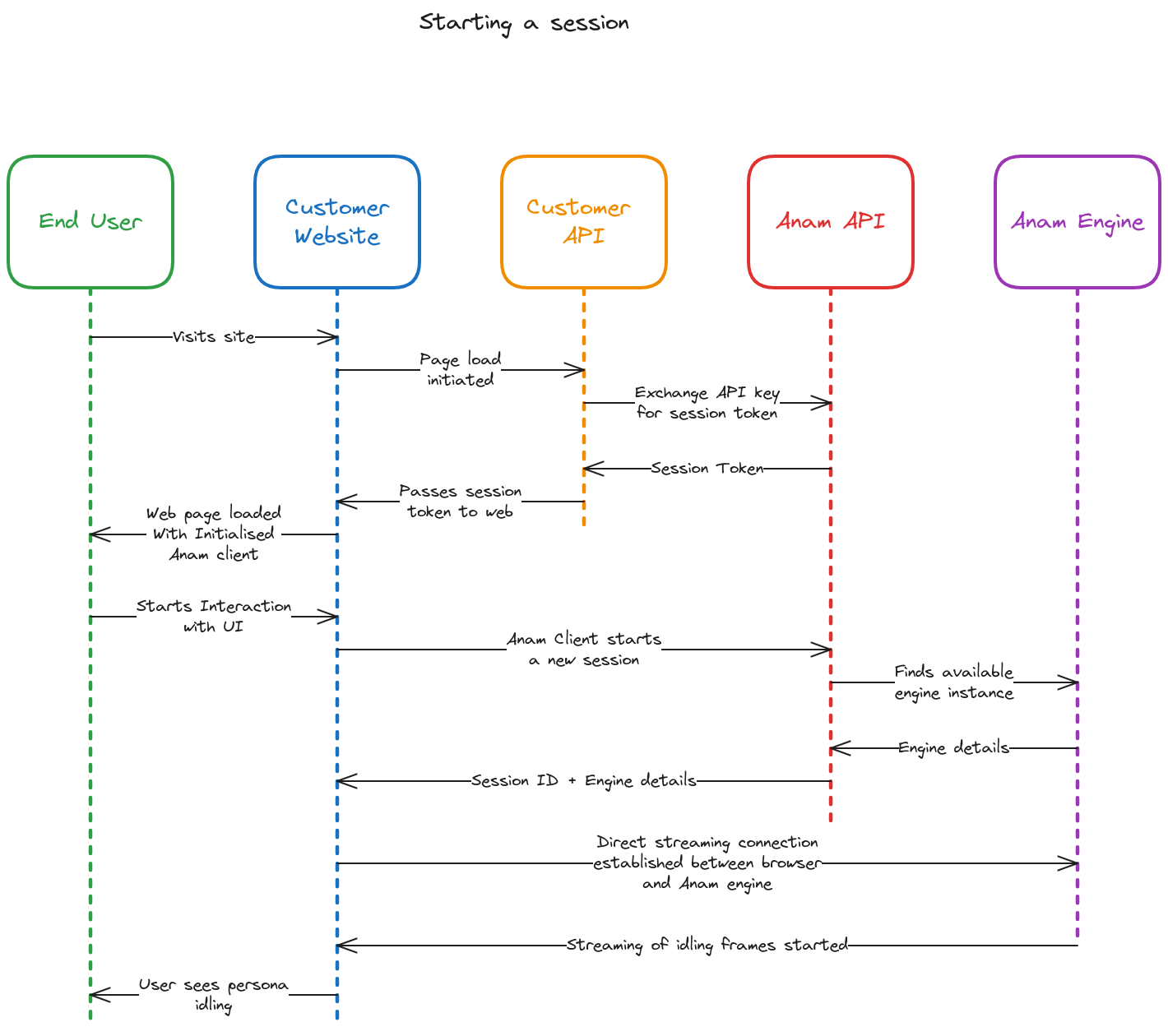
Next Steps
Talk Commands
Control persona output using talk commands
Audio Control
Control audio input and streaming behavior