> ## Documentation Index
> Fetch the complete documentation index at: https://anam.ai/docs/llms.txt
> Use this file to discover all available pages before exploring further.
# Custom Voices
> Add custom voices by cloning them with Anam or importing them from providers.
## Importing Custom ElevenLabs Voice
When creating a custom voice in ElevenLabs, make sure you share it with "anyone with the link".
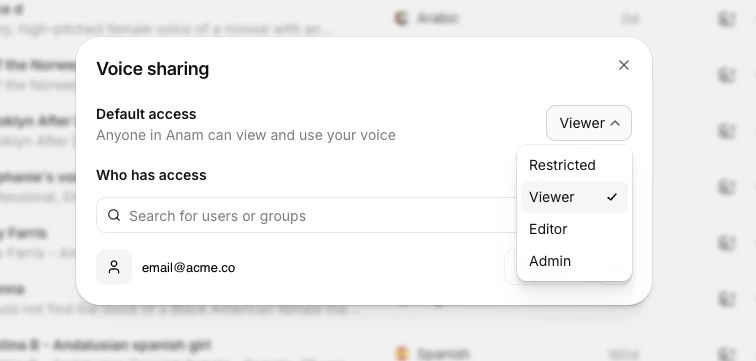 Then you can add the Voice ID into [Anam Lab](https://lab.anam.ai).
In ElevenLabs, only their **Professional Voice Clone** voice type can be shared with external organisations.
**Not working?** If importing still fails after sharing, try generating a share link within ElevenLabs and sharing it with someone from Anam (e.g. reach out to [support@anam.ai](mailto:support@anam.ai)) so we can help debug the issue.
## Next Steps
Browse available avatars to pair with your voice
Learn more about configuring personas
Write effective system prompts for multilingual personas
Understand session token creation
Then you can add the Voice ID into [Anam Lab](https://lab.anam.ai).
In ElevenLabs, only their **Professional Voice Clone** voice type can be shared with external organisations.
**Not working?** If importing still fails after sharing, try generating a share link within ElevenLabs and sharing it with someone from Anam (e.g. reach out to [support@anam.ai](mailto:support@anam.ai)) so we can help debug the issue.
## Next Steps
Browse available avatars to pair with your voice
Learn more about configuring personas
Write effective system prompts for multilingual personas
Understand session token creation