> ## Documentation Index
> Fetch the complete documentation index at: https://anam.ai/docs/llms.txt
> Use this file to discover all available pages before exploring further.
# Custom Avatar Best Practices
> Technical specifications and source image guidelines for creating custom avatars with Cara 4.
This page is for Cara 4 custom avatars, not Cara 3. Cara 3 follows similar pose and background guidance, but it uses different source image constraints.
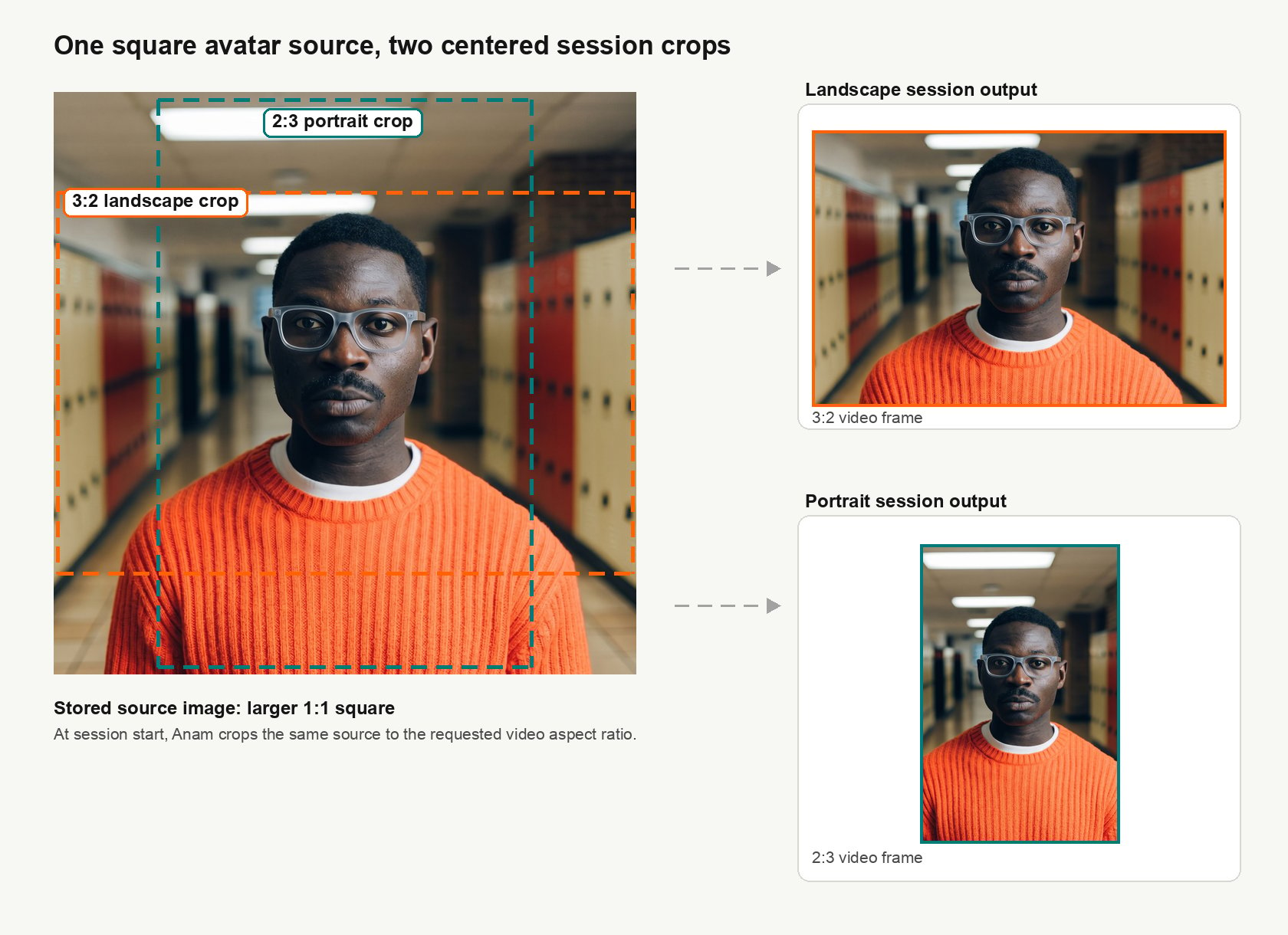
Cara 4 uses a square source image that can be cropped into landscape and portrait video. The safest upload is a high-resolution square image with clear margins around the subject.
 See [Models](/introduction/models) for when to use `cara-4` and [Video Options](/personas/session/video) for supported output sizes.
## Source image
* **Format:** Use `.png`, `.jpg`/`.jpeg`, or `.webp`, up to 4.5MB.
* **Resolution:** Use at least `1152x1152`. Higher resolution is better.
* **Margins:** Leave room around the head, shoulders, and chest so Anam can crop in for landscape or portrait output instead of extending the image with outpainting.
* **Automatic fixes:** Anam may crop, pad, or outpaint when the source image does not cover the required crop. Do not rely on this for best quality.
## Subject
* Use a relaxed, natural pose with a neutral expression.
* Keep the face sharp and visible. A mild angle is acceptable if both eyes and the full face remain visible.
* Use an eye-level or slightly low camera angle. Cara 4 does not require a low-angle or fully front-on shot.
* Keep the mouth closed, but not tense.
* Keep hands completely out of view.
## Background and appearance
* Use a plain, simple background.
* Avoid busy rooms, strong patterns, large text, and distracting logos.
* Keep the head, shoulders, and upper chest visible. Avoid tight crops.
See [Models](/introduction/models) for when to use `cara-4` and [Video Options](/personas/session/video) for supported output sizes.
## Source image
* **Format:** Use `.png`, `.jpg`/`.jpeg`, or `.webp`, up to 4.5MB.
* **Resolution:** Use at least `1152x1152`. Higher resolution is better.
* **Margins:** Leave room around the head, shoulders, and chest so Anam can crop in for landscape or portrait output instead of extending the image with outpainting.
* **Automatic fixes:** Anam may crop, pad, or outpaint when the source image does not cover the required crop. Do not rely on this for best quality.
## Subject
* Use a relaxed, natural pose with a neutral expression.
* Keep the face sharp and visible. A mild angle is acceptable if both eyes and the full face remain visible.
* Use an eye-level or slightly low camera angle. Cara 4 does not require a low-angle or fully front-on shot.
* Keep the mouth closed, but not tense.
* Keep hands completely out of view.
## Background and appearance
* Use a plain, simple background.
* Avoid busy rooms, strong patterns, large text, and distracting logos.
* Keep the head, shoulders, and upper chest visible. Avoid tight crops.