> ## Documentation Index
> Fetch the complete documentation index at: https://anam.ai/docs/llms.txt
> Use this file to discover all available pages before exploring further.
# Custom TTS (client-side)
> Use your own text-to-speech provider with Anam avatars via audio passthrough mode.
**Beta Feature**: Audio passthrough mode is currently in beta. APIs may change as we continue to improve the integration.
**Want to use ElevenLabs Agents with Anam?** We recommend the [server-side ElevenLabs integration](https://anam.ai/cookbook/elevenlabs-server-side-agents) instead—it's simpler and has lower latency. This page covers the client-side approach for when you need direct control over the audio pipeline.
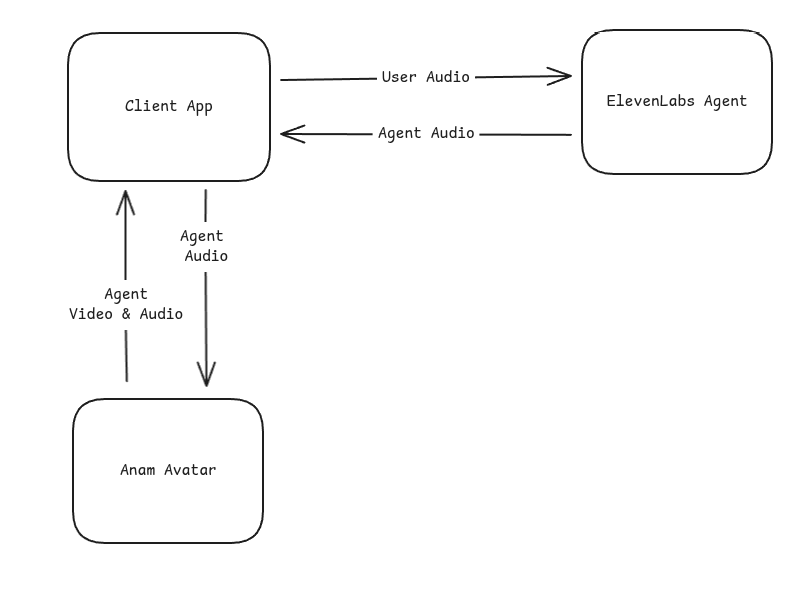
This guide shows how to use Anam's **audio passthrough** mode to pipe externally-generated speech audio into an avatar for real-time lip-sync. The example below uses [ElevenLabs Conversational AI](https://elevenlabs.io/conversational-ai) as the TTS source, but the same pattern works with **any TTS provider** (Cartesia, PlayHT, Azure Speech, Google Cloud TTS, etc.)—you just need to deliver PCM audio chunks to the Anam SDK.
Your TTS must generate audio *above* realtime speed. If your TTS provider streams audio slower than 1x realtime, you will experience **stutter and frame drops** because Anam needs extra time to buffer and render the lip-sync animation. Most cloud TTS providers stream well above realtime, but verify this before going to production.
Full source code for the ElevenLabs conversational agent with Anam avatar (client-side).
## How It Works
The integration uses Anam's **audio passthrough** mode, where Anam renders an avatar that lip-syncs to audio you provide—without using Anam's own AI or microphone input.
**Bring Your Own Voice**: Your TTS provider generates the speech audio. Anam renders the lip-synced avatar video.
## Quick Start
### Prerequisites
* An account with your TTS provider (ElevenLabs used in this example)
* [Anam](https://anam.ai) account with API access
* Node.js or Bun runtime
* Modern browser with WebRTC support (Chrome, Firefox, Safari, Edge)
### Installation
```bash theme={"system"}
npm install @anam-ai/js-sdk chatdio
```
`chatdio` provides microphone capture utilities used to send user audio to ElevenLabs.
### Basic Integration
Here's the core pattern for connecting an external TTS source to Anam:
```typescript theme={"system"}
import { createClient } from "@anam-ai/js-sdk";
// 1. Create Anam client with audio passthrough session
const anamClient = createClient(sessionToken, {
disableInputAudio: true, // Your TTS provider handles microphone
});
await anamClient.streamToVideoElement("video-element");
// 2. Create agent audio input stream
const audioInputStream = anamClient.createAgentAudioInputStream({
encoding: "pcm_s16le",
sampleRate: 16000,
channels: 1,
});
// 3. Connect to your TTS provider and forward audio
// (ElevenLabs WebSocket shown here as an example)
const ws = new WebSocket(`wss://api.elevenlabs.io/v1/convai/conversation?agent_id=${agentId}`);
ws.onmessage = (event) => {
const msg = JSON.parse(event.data);
if (msg.type === "audio" && msg.audio_event?.audio_base_64) {
// Forward audio chunks to Anam for lip-sync
audioInputStream.sendAudioChunk(msg.audio_event.audio_base_64);
}
if (msg.type === "agent_response") {
// Signal end of audio sequence
audioInputStream.endSequence();
}
if (msg.type === "interruption") {
// Handle barge-in: stop the avatar animation and end the audio sequence
anamClient.interruptPersona();
audioInputStream.endSequence();
}
};
```
## Full Example
### Project Structure
```
src/
├── client.ts # Main client orchestration
├── elevenlabs.ts # ElevenLabs WebSocket handling
└── routes/
└── api/
└── config.ts # Server-side session token endpoint
```
### Server: Create Anam Session
Your server creates an Anam session token with `enableAudioPassthrough: true`:
```typescript config.ts theme={"system"}
const response = await fetch("https://api.anam.ai/v1/auth/session-token", {
method: "POST",
headers: {
"Content-Type": "application/json",
Authorization: `Bearer ${ANAM_API_KEY}`,
},
body: JSON.stringify({
personaConfig: {
avatarId: AVATAR_ID,
avatarModel: "cara-4",
enableAudioPassthrough: true, // Enable external audio input
},
}),
});
const { sessionToken } = await response.json();
```
### Client: ElevenLabs Module
Handle the WebSocket connection and microphone capture:
```typescript elevenlabs.ts theme={"system"}
import { MicrophoneCapture, arrayBufferToBase64 } from "chatdio";
const SAMPLE_RATE = 16000;
export interface ElevenLabsCallbacks {
onReady?: () => void;
onAudio?: (base64Audio: string) => void;
onUserTranscript?: (text: string) => void;
onAgentResponse?: (text: string) => void;
onInterrupt?: () => void;
onError?: () => void;
onDisconnect?: () => void;
}
export async function connectElevenLabs(agentId: string, callbacks: ElevenLabsCallbacks) {
const ws = new WebSocket(`wss://api.elevenlabs.io/v1/convai/conversation?agent_id=${agentId}`);
// Set up microphone capture
const mic = new MicrophoneCapture({
sampleRate: SAMPLE_RATE,
echoCancellation: true,
noiseSuppression: true,
});
mic.on("data", (data: ArrayBuffer) => {
if (ws.readyState === WebSocket.OPEN) {
ws.send(
JSON.stringify({
user_audio_chunk: arrayBufferToBase64(data),
})
);
}
});
ws.onopen = async () => {
await mic.start();
callbacks.onReady?.();
};
ws.onmessage = (event) => {
const msg = JSON.parse(event.data);
switch (msg.type) {
case "audio":
callbacks.onAudio?.(msg.audio_event.audio_base_64);
break;
case "agent_response":
callbacks.onAgentResponse?.(msg.agent_response_event.agent_response);
break;
case "user_transcript":
callbacks.onUserTranscript?.(msg.user_transcription_event.user_transcript);
break;
case "interruption":
callbacks.onInterrupt?.();
break;
case "ping":
ws.send(JSON.stringify({ type: "pong", event_id: msg.ping_event.event_id }));
break;
}
};
ws.onclose = () => {
mic.stop();
callbacks.onDisconnect?.();
};
}
```
### Client: Main Integration
Wire everything together:
```typescript client.ts theme={"system"}
import { createClient } from "@anam-ai/js-sdk";
import { connectElevenLabs } from "./elevenlabs";
async function startConversation() {
// Get session config from your server
const { anamSessionToken, elevenLabsAgentId } = await fetch("/api/config").then((r) => r.json());
// Initialize Anam avatar (disable input audio since ElevenLabs handles mic)
const anamClient = createClient(anamSessionToken, {
disableInputAudio: true,
});
await anamClient.streamToVideoElement("anam-video");
// Create agent audio input stream
const audioInputStream = anamClient.createAgentAudioInputStream({
encoding: "pcm_s16le",
sampleRate: 16000,
channels: 1,
});
// Connect to ElevenLabs
await connectElevenLabs(elevenLabsAgentId, {
onAudio: (audio) => {
audioInputStream.sendAudioChunk(audio);
},
onAgentResponse: () => {
audioInputStream.endSequence();
},
onInterrupt: () => {
anamClient.interruptPersona();
audioInputStream.endSequence();
},
});
}
```
### Cleanup
Stop the conversation and release resources:
```typescript theme={"system"}
function stopConversation() {
anamClient.stopStreaming();
}
```
## Configuration
### Environment Variables
You'll need credentials from both services:
| Service | Where to get it |
| -------------- | -------------------------------------------------------- |
| **Anam** | [lab.anam.ai](https://lab.anam.ai) → Settings → API Keys |
| **ElevenLabs** | [elevenlabs.io](https://elevenlabs.io) → Agents |
```bash .env theme={"system"}
# Anam credentials
ANAM_API_KEY=your_anam_api_key
ANAM_AVATAR_ID=your_avatar_id
# ElevenLabs credentials
ELEVENLABS_AGENT_ID=your_agent_id
```
### ElevenLabs Agent Setup
When configuring your ElevenLabs agent, set the output audio format to match Anam's expectations:
| Setting | Value |
| --------------- | ---------- |
| **Format** | PCM 16-bit |
| **Sample Rate** | 16000 Hz |
| **Channels** | Mono |
Mismatched audio formats will cause lip-sync issues. Ensure your TTS provider outputs PCM16 at 16kHz.
### Choosing an Avatar
Browse ready-to-use avatars in our gallery. Copy the avatar ID directly into your config.
Create your own personalized avatar in Anam Lab with custom appearance and style.
## Audio Passthrough API
To guide avatar expression in audio passthrough sessions, send Director Notes cues over the data channel. See [Director Notes](/personas/director-notes#send-cues-over-the-data-channel).
### createAgentAudioInputStream()
Creates a stream for sending audio chunks to the avatar for lip-sync. Must be called **after** `streamToVideoElement()` resolves (the session must be started first).
```typescript theme={"system"}
const audioInputStream = anamClient.createAgentAudioInputStream({
encoding: "pcm_s16le",
sampleRate: 16000,
channels: 1,
});
```
Audio encoding format. Only `pcm_s16le` (16-bit signed little-endian PCM) is supported.
Sample rate in Hz. Should match your TTS provider output (typically 16000).
Number of audio channels. Use `1` for mono.
### sendAudioChunk()
Send a base64-encoded audio chunk for lip-sync rendering.
```typescript theme={"system"}
audioInputStream.sendAudioChunk(base64AudioData);
```
Audio chunks can be sent **faster than realtime**. Anam buffers them internally and renders lip-sync at the correct pace.
### endSequence()
Signal that the current audio sequence has ended. This helps Anam optimize lip-sync timing and handle transitions.
```typescript theme={"system"}
audioInputStream.endSequence();
```
Call this when:
* Your TTS provider signals the agent has finished speaking
* The user interrupts (barge-in)
## Handling Interruptions
When a user speaks while the agent is talking (barge-in), your TTS provider sends an interruption event. Handle it by interrupting the avatar and ending the audio sequence:
```typescript theme={"system"}
onInterrupt: () => {
anamClient.interruptPersona();
audioInputStream.endSequence();
},
```
`interruptPersona()` stops the avatar's current lip-sync animation immediately. `endSequence()` tells the audio stream that the current sequence is done. Both are needed—without `interruptPersona()`, the avatar may continue playing buffered audio.
## Performance Considerations
### Latency
This integration combines two real-time services, which adds latency compared to using Anam's turnkey solution:
| Path | Typical Latency |
| ---------------------------- | --------------- |
| User speech → ElevenLabs STT | 200-400ms |
| ElevenLabs LLM processing | 300-800ms |
| ElevenLabs TTS → Anam avatar | 100-200ms |
| **Total end-to-end** | **600-1400ms** |
For lower latency requirements, consider using Anam's [turnkey solution](/javascript-sdk/quickstart) which handles STT, LLM, and TTS in an optimized pipeline, or the [server-side ElevenLabs integration](https://anam.ai/cookbook/elevenlabs-server-side-agents) which reduces latency through server-to-server audio flow.
### Browser Compatibility
The integration requires WebRTC support. Tested browsers:
| Browser | Support |
| ----------- | ------------ |
| Chrome 80+ | Full support |
| Firefox 75+ | Full support |
| Safari 14+ | Full support |
| Edge 80+ | Full support |
Mobile browsers are supported but may have higher latency on cellular networks.
## Billing
When using audio passthrough mode:
* **Anam**: Billed for avatar streaming time (session duration)
* **TTS Provider**: Billed separately for STT, LLM, and TTS usage
Check both [Anam pricing](https://anam.ai/pricing) and your TTS provider's pricing to understand total costs.
## When to Use This Approach
This **client-side** approach is a good fit when you:
* Need direct control over the audio pipeline in the browser
* Want to use client-side tools with your TTS provider's agent
* Have an existing client-side integration you want to add avatars to
For most new projects, we recommend the **[server-side integration](https://anam.ai/cookbook/elevenlabs-server-side-agents)** instead—it's simpler to set up and has lower latency.
## Troubleshooting
* Verify audio format matches (PCM16, 16kHz, mono)
* Check that `sendAudioChunk()` is receiving data
* Ensure the audio input stream was created successfully
* Look for errors in browser console
* Call `endSequence()` when agent responses complete
* Ensure you're handling interruptions correctly
* Check network latency to both services
* Verify your TTS provider agent is configured correctly
* Check the WebSocket connection is established
* Look for audio events in the message handler
* Confirm your agent ID is correct
* Check browser permissions for microphone access
* Ensure `echoCancellation` is enabled to prevent feedback
* Verify the microphone is sending data at 16kHz
* Verify your `ANAM_API_KEY` is valid
* Check that `enableAudioPassthrough: true` is set in the session request
* Ensure the avatar ID exists in your account
## Resources
Recommended: simpler setup with lower latency
Full source code for the client-side integration
Guide to using ElevenLabs V3 expressive voices with Anam
Browse available stock avatars